
LogoOmni Video Pro
  • Start Making Omni Videos
  • Agent
  • AI Image Creator
  • Omni AI Video Generator
  • Omni Video Pro Pricing
Now available to all public community members and creative creators across the globeSeptember 2025

Seedream 4: Polished Image Generation & Reference-Driven Editing Workflow

Seedream 4 is the foundational early iteration of the Seedream workflow built for precise image creation and reference-led edits, perfect for teams relying on a stable hosted setup with prompt optimization, streamlined iterative refinement, and polished commercial assets before upgrading to the 4.5 or 5.0 family updates.

Loading...

Prompt:

1:1

4:3

3:4

16:9

9:16

3:2

2:3

Model:
Resolution

Loading...

Scene Examples 1
Getting Started with Seedream 4

Use Seedream 4 on this page for a reliable, refined hosted image creation workflow

Start with a detailed commercial project brief, upload reference images to lock in your product or brand design identity, and iterate on your output using a consistent, high-resolution workflow.

01

Draft your request as a formal commercial creative brief

Pinpoint the core subject, materials, composition, and target tone for your image within your brand or campaign guidelines.

02

Upload Reference Images to Solidify Brand Identity or Color Palettes

Upload up to 10 reference images when your project needs to align product details, color palettes, or visual direction with an existing creative brief.

03

Refine Your Output with Targeted, Review-Focused Tweaks

Focus your revisions on composition, material quality, and overall presentation to polish the frame with each iteration for a sharper final output.

Key Strengths of Seedream 4

What Makes Seedream 4 Stand Out as a Reliable, Well-Established Workflow

Seedream 4 excels when your team needs polished commercial imagery, high-resolution review-ready output, and a hosted workflow that stays consistent across multiple refinement cycles.

Campaign-Ready Outputs with a Steady Hosted Workflow

Seedream 4 is ideal when your final output needs to feel ready for internal campaign reviews, rather than a quick exploratory draft.

This makes it ideal for editorial drafts, brand mood boards, and polished concept reviews.
It retains a professional commercial tone without relying on overly aggressive stylization.
Choose it when consistent iteration matters more than trying out the latest family update.

Exceptional for Hospitality and Space-Focused Imagery

Seedream 4 delivers stunning results with prompts focused on materials, camera angle, lighting, and a curated hospitality mood.

This makes it ideal for lounges, restaurants, hotels, and brand-aligned lifestyle interior spaces.
It shines when your material story needs to feel sharp and authentic.
Its workflow stays simple for review cycles and iterative tweaks.

Perfect for Product Mood Boards and Beauty Still Lifes

Seedream 4 is an excellent pick when your final image needs to feel polished, calm, and commercially viable without a complex creative setup.

This is ideal for skincare, tabletop product photography, and understated brand presentation visuals.
The model delivers best results when color palette, lighting, and core product are all tightly aligned.
It keeps the scene clean when your commercial project context is clearly outlined.

Excels at Subdued Editorial Fashion Direction

Seedream 4 skillfully handles wardrobe, subject, and location prompts when the target mood feels high-end yet curated.

This makes it ideal for editorial drafts and brand-aligned fashion concepts.
It performs best when your brief lays out a single clear editorial tone.
The final image will stay polished without feeling overly dramatic.
Top Use Cases

Ideal Applications for Seedream 4

Seedream 4 excels when your project needs polished commercial imagery, high-resolution review-ready output, and a hosted workflow that stays consistent across multiple refinement cycles.

Campaign and Editorial Drafts

Use this tool for campaign drafts, editorial layouts, and commercial direction imagery that needs to feel polished yet flexible for post-generation edits.

Product Mood Boards and Branded Still Lifes

It’s a top pick for product review boards, brand assets, and still-life concepts where structured composition and surface precision are critical.

Hospitality and Lifestyle Concepts

Incorporate this tool into interior design, hospitality, and lifestyle projects when you need a stable hosted workflow for sharp, professional commercial imagery.

High-Resolution Review-Ready Visuals

Choose Seedream 4 when your team needs review-ready images in larger file dimensions without switching workflows mid-project.

Prompt Formulas & Real-World Examples

Crafting Stronger Seedream 4 prompts: Formulas & Real-World Examples

These examples focus on polished commercial requests. Seedream 4 delivers optimal results when your image goal, material story, and intended use case are all clearly laid out.

Hospitality Design Project

Complies with Premium prompt Alignment Benchmark Standards

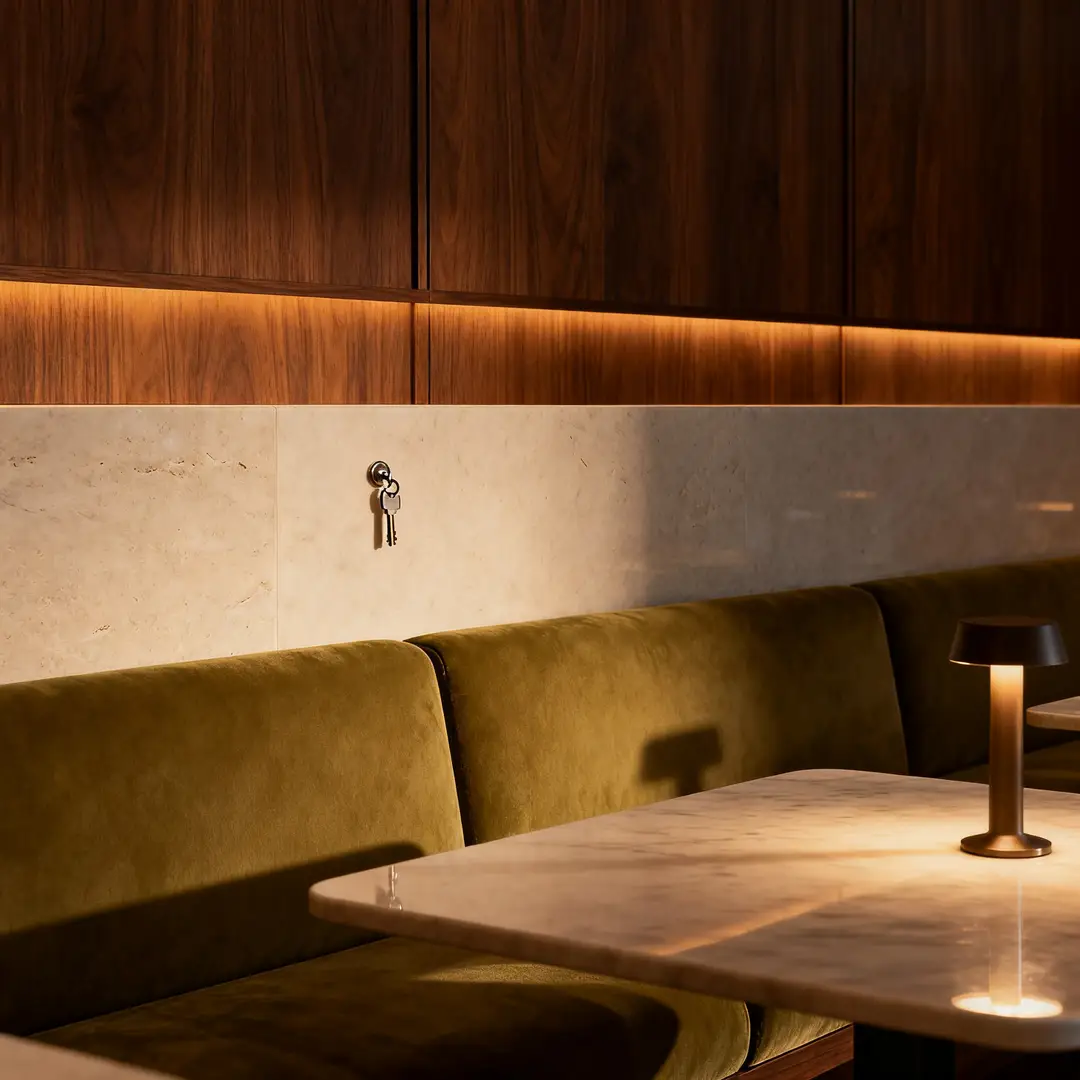
Ideal for hospitality visuals that need a polished commercial mood without feeling overly stylized.

Luxury hotel lounge key visual with warm, clean materials, soft controlled lighting, and a polished hospitality mood.

Luxury Hotel Lounge Key Visual

Proven industry Prompt best-practice framework for creative generation workflows

[Core Scene] + [Materials] + [Camera Perspective] + [Lighting] + [Hospitality Mood]

Dive Into Full prompt Documentation & Technical BreakdownsExamine The Full Comprehensive Breakdown

Comprehensive prompt Breakdown & Full Overview

Create a polished luxury hotel lounge key visual featuring walnut paneling, pale stone surfaces, olive-green upholstery, and soft low evening lighting. Use a wide yet grounded camera perspective, uncluttered composition, and a high-end hospitality mood perfect for campaign or design review decks.

Core Functional Elements That Power This Prompt To Deliver Standout, High-fidelity Results

Seedream 4 delivers stronger results when the prompt lays out a commercial scene with clear material and lighting direction.

Target Final AI-Created Visual Project Deliverable

A polished hospitality concept image for campaign planning and design review.

Insider Pro Tips For Creative Industry Professionals

  • Let your material story guide the scene.
  • Stick to a straightforward, realistic camera perspective.
Beauty and Skincare Project

Complies with Premium prompt Alignment Benchmark Standards

Ideal for beauty visuals that need to feel polished, calm, and ready for brand review.

Editorial skincare serum still life with calm, cohesive palette control and polished product detail.

Editorial Skincare Serum Still Life

Proven industry Prompt best-practice framework for creative generation workflows

[Hero Product] + [Surface] + [Lighting] + [Color Palette] + [Editorial Mood]

Dive Into Full prompt Documentation & Technical BreakdownsExamine The Full Comprehensive Breakdown

Comprehensive prompt Breakdown & Full Overview

Create an editorial skincare serum still life staged on pale stone, with soft morning side lighting, muted sage and ivory accents, subtle glass reflections, and a serene high-end skincare mood. The final frame should feel polished and commercial rather than overly experimental.

Core Functional Elements That Power This Prompt To Deliver Standout, High-fidelity Results

The prompt tightly aligns the product, palette, and mood, which helps Seedream 4 deliver a polished commercial result.

Target Final AI-Created Visual Project Deliverable

A sharp beauty still life for brand direction and campaign review.

Insider Pro Tips For Creative Industry Professionals

  • Keep prop count low when your product is the central focus.
  • Stick to one cohesive serene color palette instead of mixing multiple conflicting color schemes.
Editorial Fashion Draft Project

Complies with Premium prompt Alignment Benchmark Standards

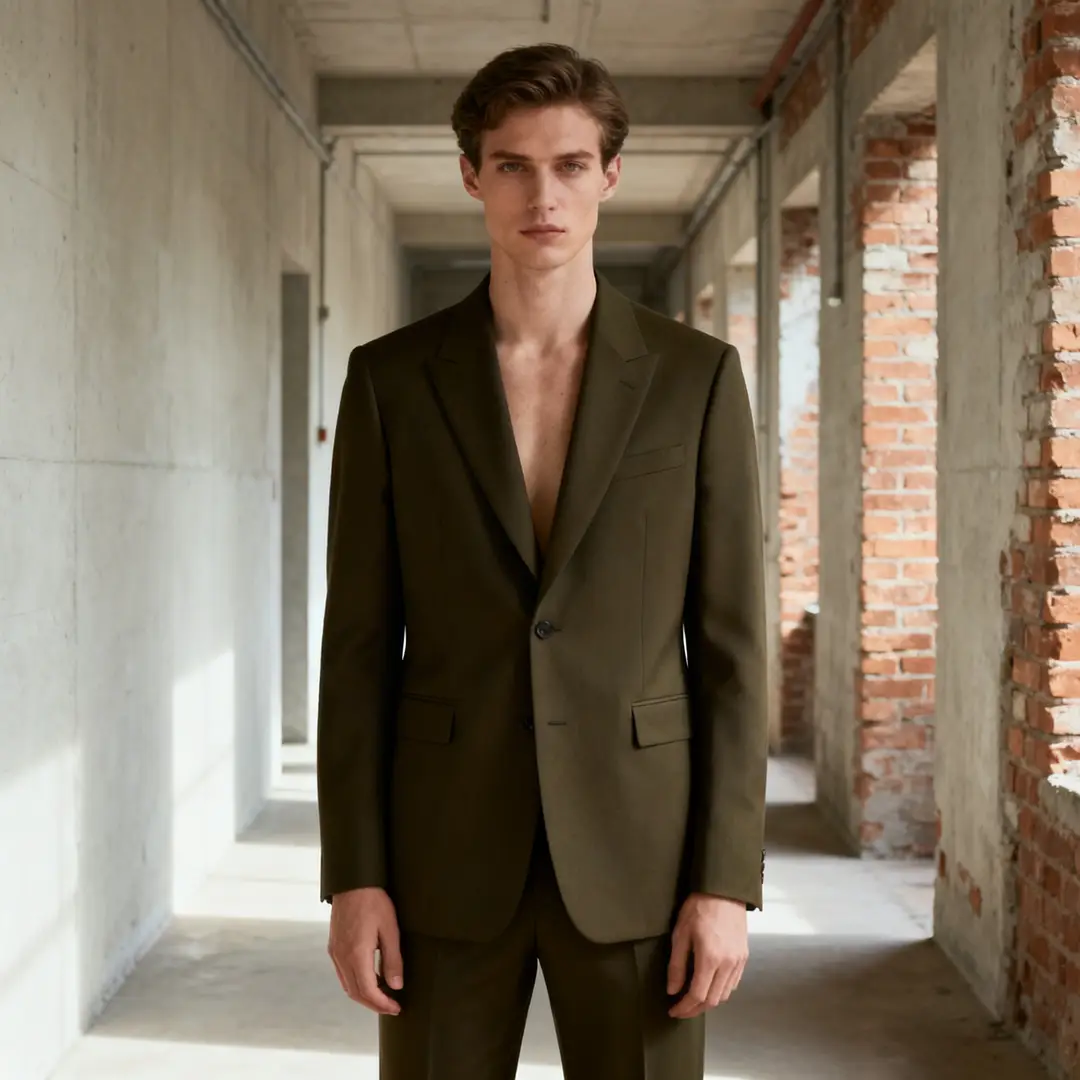
Ideal for commercial editorial frames that need polishing but still allow for iterative tweaks.

Curated editorial fashion frame with understated styling and polished commercial lighting.

Curated Editorial Fashion Frame

Proven industry Prompt best-practice framework for creative generation workflows

[Subject] + [Wardrobe] + [Location] + [Lighting] + [Editorial Mood]

Dive Into Full prompt Documentation & Technical BreakdownsExamine The Full Comprehensive Breakdown

Comprehensive prompt Breakdown & Full Overview

Create an editorial fashion frame featuring a model in dark olive tailored clothing standing in a muted industrial hallway. Use soft directional lighting, understated styling, natural posture, and a high-end editorial mood that feels ready for review without feeling overly dramatic.

Core Functional Elements That Power This Prompt To Deliver Standout, High-fidelity Results

Seedream 4 executes this type of clear wardrobe and lighting brief effectively when the mood is curated and understated.

Target Final AI-Created Visual Project Deliverable

A commercial editorial concept for fashion and brand alignment review.

Insider Pro Tips For Creative Industry Professionals

  • Match your wardrobe and setting to the same tonal family.
  • Stick to one clear editorial direction instead of mixing multiple conflicting reference images.
Restaurant Campaign Concept Project

Complies with Premium prompt Alignment Benchmark Standards

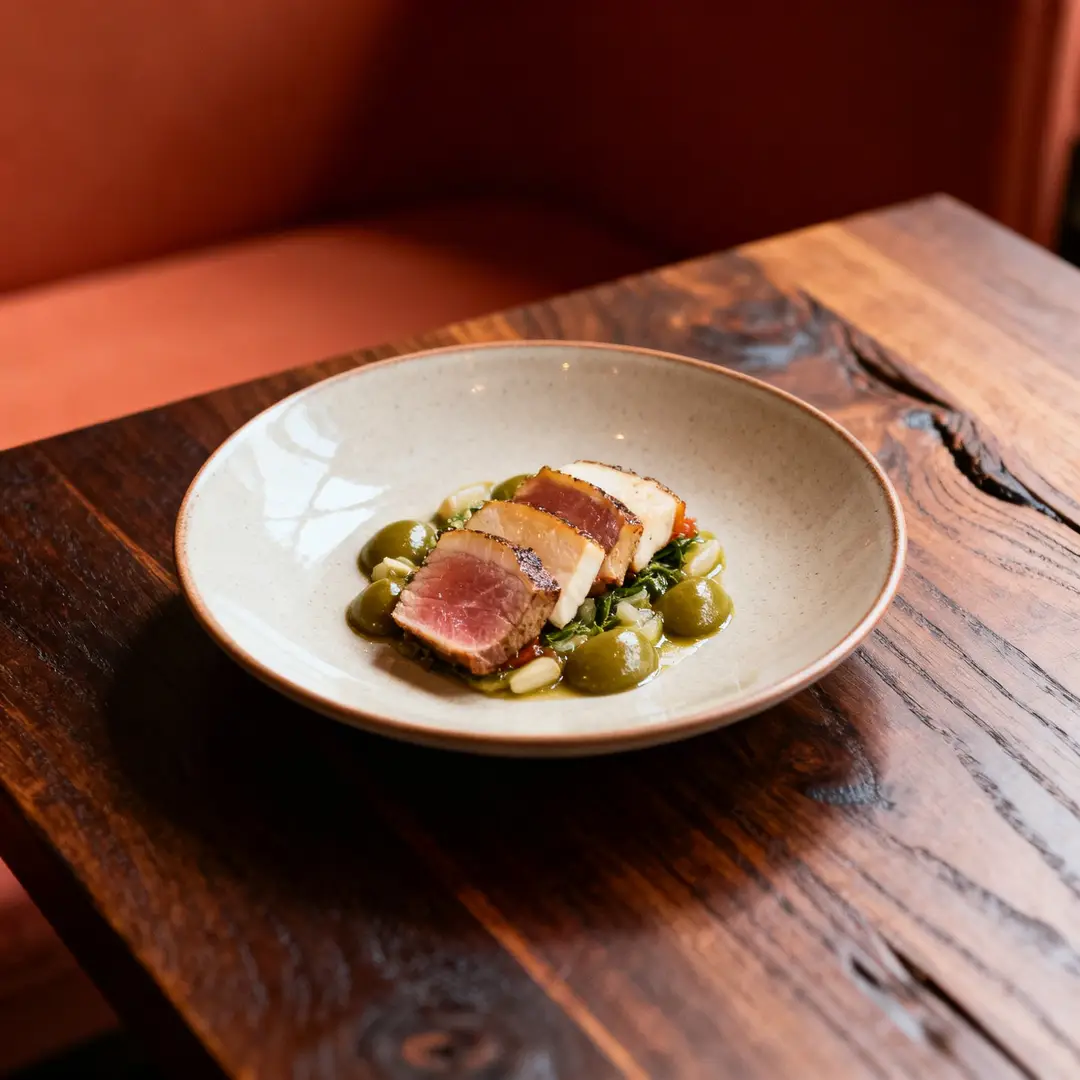
Ideal for lifestyle campaign images that need a polished yet realistic commercial aesthetic.

Restaurant brand campaign frame with polished warm lighting, balanced color palette, and a believable commercial mood.

Restaurant Brand Campaign Frame

Proven industry Prompt best-practice framework for creative generation workflows

[Core Subject] + [Environment] + [Lighting] + [Color Palette] + [Campaign Brief]

Dive Into Full prompt Documentation & Technical BreakdownsExamine The Full Comprehensive Breakdown

Comprehensive prompt Breakdown & Full Overview

Create a restaurant brand campaign frame featuring a single plated dish on a dark wood table, with warm ambient lighting, muted terracotta and olive accents, and a curated hospitality mood. The final image should read as a polished commercial campaign draft rather than a casual smartphone photo.

Core Functional Elements That Power This Prompt To Deliver Standout, High-fidelity Results

The prompt gives Seedream 4 a single core subject, environment, and commercial brief, which helps keep the scene focused and tidy.

Target Final AI-Created Visual Project Deliverable

A polished food and hospitality campaign concept for brand review.

Insider Pro Tips For Creative Industry Professionals

  • Clearly state the commercial use case if the image should not feel casual.
  • Stick to a muted color palette when your food or core subject should be the central focus.
When to Choose Seedream 4

Choose Seedream 4 When You Need a Stable Hosted Workflow and Polished Commercial Results

Seedream 4 is the perfect pick when you need polished campaign and review imagery within a stable hosted workflow before upgrading to newer family updates.

Choose Seedream 4 When Consistent Hosted Iteration Matters More Than the Latest Family Update

Use this tool for campaign drafts, product mood boards, hospitality scenes, and other commercial visuals that excel with a consistent, polished workflow.

Choose a Different Model When Newer Variants or Alternative Strengths Are a Better Match

Choose Seedream 4.5 for sharper high-resolution polish, Seedream 5.0 for the newest family workflow, and GPT-4o when text rendering and layout editing are your top priorities.

Creator and Community Validation

Video Walkthroughs and Independent Reviews of Seedream 4

These videos show how creators use Seedream 4 for product imagery and streamlined hosted generation, offering independent validation of the mature commercial workflow covered on this page.

Curated Gallery of AI-Driven Video Generation Masterpieces

FAQs

FAQ

About Omni Video Pro, Google Omni AI Video, and current generative AI video generation support

What is Seedream 4?

Seedream 4 is the foundational early release of the Seedream workflow available on this page. It’s engineered for polished image creation and reference-led edits, with a consistent, well-tested hosted environment.

What is Seedream 4 best for?

Seedream 4 shines for campaign drafts, editorial layouts, product mood boards, hospitality design concepts, and other commercial projects that require a polished, steady hosted workflow.

Does Seedream 4 support image input here?

Absolutely. Right here, Seedream 4 lets you upload up to 10 reference images, perfect for aligning product vision, matching color schemes, and refining visuals where multiple reference inputs shape the final output.

Which resolutions and aspect ratios does Seedream 4 support here?

You’ll find support for 1K, 2K, and 4K when using Seedream 4 here. Compatible aspect ratios include 1:1, 4:3, 3:4, 16:9, 9:16, 3:2, and 2:3.

How do I write better Seedream 4 prompts?

Craft stronger requests by clearly outlining your core subject, commercial context, and desired visual tone for your image. Seedream 4 performs best when your prompt explicitly details materials, lighting, and intended use case, rather than relying on vague style buzzwords.

When should I use Seedream 4 instead of Seedream 4.5 or 5.0?

Opt for Seedream 4 if you want the steady, trusted behavior of the original Seedream family and a stable hosted workflow. Switch to Seedream 4.5 if sharp, high-resolution polish is your top priority. Opt for Seedream 5.0 for the newest family update that includes expanded multi-image reference support.

Is Seedream 4 good for campaign and editorial visuals?

Without a doubt. Seedream 4 excels for campaign drafts, editorial layouts, and commercial direction imagery when you need a polished hosted output that avoids overly dramatic or hyper-stylized visual flourishes.

Can I use Seedream 4 images commercially?

For professional production use, treat Seedream 4-generated images identically to outputs from other hosted models by conducting a thorough review before publishing. Commercial viability will vary based on your unique project requirements, internal review workflows, and the platform’s official terms of service on this page.

Still have questions about Omni Video Pro? Our dedicated pro support team is ready to assist you

Join Our Creator Discord Server
Related Models

Compare Seedream 4 to Other Image Models on This Page

If Seedream 4 isn’t the right fit, compare it to these model pages to find options with stronger high-resolution polish, a newer family update, or more robust text-focused editing.

Seedream 4.5: Image Generator

Open Seedream 4.5 when you want a more polished high-resolution workflow within the same Seedream family.

Explore Our Curated Selection Of Companion AI Generation Models

Seedream 5.0: Image Generator

Compare Seedream 5.0 against other options when you’re searching for the newest Seedream family update on this page.

Explore Our Curated Selection Of Companion AI Generation Models

GPT-4o: Image Generator

Try GPT-4o when text rendering and layout-focused editing matter more than a dedicated commercial image workflow.

Explore Our Curated Selection Of Companion AI Generation Models

Gemini 3 Pro: Image Generator

Compare Gemini 3 Pro Image against other tools when you’re looking for another high-fidelity hosted workflow for structured creative projects.

Explore Our Curated Selection Of Companion AI Generation Models

Try Seedream 4 on This Page

Open the generator, start with a detailed commercial brief, and use Seedream 4 for polished hosted iterative work on this page.

Omni Video Pro Resources
  • Omni Video Pro Blog
  • Start Creating Omni Videos with Omni Video Pro
  • Omni Video Pro Scenes
  • My Generated Omni Video Works
  • Prompts
  • Image to Prompt
  • Batch Image to Prompt
Omni Video Pro Company & Omni Video Pro Legal
  • About Omni Video Pro
  • Contact Omni Video Pro
  • Omni Video Pro Privacy Policy
  • Omni Video Pro Terms of Service
  • Omni Video Pro Refund Policy
Image Models
  • Z-Image
  • GPT-4o
  • Flux 2
  • Flux 2 Pro
  • Flux 2 Klein
  • Qwen Image 2
  • Seedream 4.0
  • Seedream 4.5
  • Seedream 5.0
  • Grok Imagine
  • Gemini 3 Pro Image
  • Nano Banana Flash
  • Nano Banana 2
Video Models
  • Google Veo 3.1
  • Google Veo 3.1 Lite
  • Google Veo 3.1 Pro
  • Seedance 1.5 Pro
  • Seedance Fast
  • Seedance Quality
  • Seedance 2.0
  • Hailuo 02
  • Kling v2.6
  • Kling v2.5 Turbo
  • Kling v2.1
  • Kling v2.1 Master
  • Kling O1
  • Kling v3.0
  • Kling v3.0 Pro
Omni Video Pro Partnered Tools
  • Omni Video Pro
  • Seedream AI
  • Kling AI
LogoOmni Video Pro

Omni Video Pro AI video prompts · Current Model Generation · Omni Creator Waitlist

TwitterX (Twitter)DiscordEmail

Omni Video Pro is an independent third-party AI video workspace and AI video creator waitlist. We are not affiliated with Google, Gemini, Veo, OpenAI, ByteDance, or any model provider. Model availability, names, pricing, and capabilities may change without prior warning.

© 2026 Omni Video Pro All Rights Reserved. DREAMEGA INFORMATION TECHNOLOGY LLC

[email protected]