
LogoOmni Video Pro
  • Start Making Omni Videos
  • Agent
  • AI Image Creator
  • Omni AI Video Generator
  • Omni Video Pro Pricing
Now available to all public community members and creative creators across the globeFebruary 2026

Seedream 5: High-Resolution Image Generator

Built for modern creative professionals, Seedream 5.0 delivers a refined image generation and reference-editing workflow with updated family-specific performance, expanded multi-image support, and sharp, commercial-grade high-resolution outputs all within a single streamlined hosted pipeline.

Loading...

Prompt:

auto

1:1

5:2

16:9

9:16

4:3

3:4

Model:
Resolution

Loading...

Scene Examples 1
Working With Seedream 5.0: A Step-by-Step Guide

Get the Most Out of Seedream 5.0 on This Page for Polished Seedream Generation & Expanded Multi-Image Reference Editing

Begin with a clear, detailed image brief, outline the value each reference image will add to the final output, and iterate until the frame is polished enough for formal client or internal review at your selected resolution.

01

Write a prompt That Clearly Defines Your Image’s Core Objective

Outline the core subject, scene setup, desired final finish quality, and the specific review or campaign context the image will support.

02

Define Clear Roles for Each Reference Image

Upload up to 14 reference images when multiple products, color palettes, or style details need to inform a single final output.

03

Refine Until You Have a Review-Ready Final Frame

Tweak composition, material details, and focal points until the image reads as a polished campaign or product review asset ready for formal approval.

Key Strengths of Seedream 5.0

What Makes Seedream 5.0 Stand Out as the Latest Seedream Workflow

Seedream 5.0 shines when multiple reference images will inform one polished final output, when the finished piece needs to feel campaign-ready straight away, and when you want the most up-to-date Seedream family-specific performance for your creative workflow.

Expanded Multi-Image Support for Streamlined Campaign Boards

Seedream 5.0 excels when multiple products, color palettes, or style details need to inform a single high-resolution campaign or board frame.

This makes it perfect for travel kit collections, product families, and larger brand system campaign boards.
The workflow remains practical even when one final image relies on multiple aligned reference inputs.
It’s a great fit for projects where a single-reference workflow would be too limited in scope.

Polished Workflow for Campaign-Ready Visuals

Seedream 5.0 delivers top-tier results when you want the final image to feel like a polished campaign review asset instead of a rough initial draft.

This is especially helpful for product launches, beverage campaigns, and commercial concept review sessions.
It performs best when your prompt clearly outlines the campaign context for the image.
The final frame will feel more polished and ready for review at larger output dimensions.

Perfect for Premium Beauty & Close-Up Detail Work

Seedream 5.0 excels at close-up commercial beauty visuals when the subject, product, color palette, and lighting are tightly aligned.

This makes it a perfect fit for skincare, cosmetics, and premium beauty campaign concepts.
It delivers best-in-class results when your prompt clarifies both the product’s role and your desired final finish quality.
The model produces stronger results when beauty briefs stay cohesive rather than overloaded with conflicting details.

Ideal for Retail & Brand Environment Presentation Work

Seedream 5.0 works well for retail window displays, brand environments, and other presentation-focused concepts that need to look polished for internal deck reviews.

This expands its use cases beyond just product-focused work.
It performs best when you clearly outline materials, display elements, and your desired brand mood.
The final image will stay presentation-ready without overcomplicating the overall composition.
Key Use Cases

Ideal Use Cases for Seedream 5.0

Seedream 5.0 excels when your workflow relies on updated Seedream-specific performance, high-resolution outputs, and multiple reference images to create a single cohesive visual.

Brand Campaign Boards & Lead Brand Imagery

Ideal for campaign boards, lead brand visuals, and commercial draft assets that require a polished frame with space for additional refinement.

Multi-Product & Brand System Visual Assets

Perfect for aligning multiple products or design elements into a single cohesive visual direction for brand system assets.

Stylized Commercial Visual Scenes

Use Seedream 5.0 for stylized commercial imagery when you want outputs that feel polished, intentional, and ready for client or internal approval.

High-Resolution Review & Approval Assets

Opt for this tool when high-resolution 2K or 4K review assets are critical, and you want the image to remain editable across multiple revision cycles.

Prompt Prompt Examples & Prompt Writing Tips

Crafting Strong Seedream 5.0 prompts: Practical Real-World Examples

These examples center on polished multi-subject and commercial creative projects. Seedream 5.0 delivers top-tier results when your prompt clearly defines what should appear in the frame and how the image will fit into a review or campaign context.

Product Line Board

Complies with Premium prompt Alignment Benchmark Standards

Perfect for coordinated multi-item product boards that feel brand-consistent instead of a disjointed collage.

A luxury travel kit concept board with coordinated products, refined materials, and a clean review-focused layout.

Luxury Travel Kit Concept Board

Proven industry Prompt best-practice framework for creative generation workflows

[product family] + [layout] + [palette] + [materials] + [review-board mood]

Dive Into Full prompt Documentation & Technical BreakdownsExamine The Full Comprehensive Breakdown

Comprehensive prompt Breakdown & Full Overview

Craft a luxury travel kit concept board featuring a carry-on bag, toiletry pouch, passport sleeve, and neck pillow. Use a warm taupe, charcoal, and brushed silver color palette, a clean top-down layout, and a polished review-board mood designed for a luxury travel brand’s strategic planning deck.

Core Functional Elements That Power This Prompt To Deliver Standout, High-fidelity Results

Seedream 5.0 delivers strong results when multiple products are unified by a single consistent color palette and board-focused layout.

Target Final AI-Created Visual Project Deliverable

A cohesive brand board for product family review and campaign strategy planning.

Insider Pro Tips For Creative Industry Professionals

  • Include the full product family to maintain a cohesive, unified board feel.
  • Stick to one clean board layout rather than mixing multiple disconnected scenes.
Commercial Campaign Concept

Complies with Premium prompt Alignment Benchmark Standards

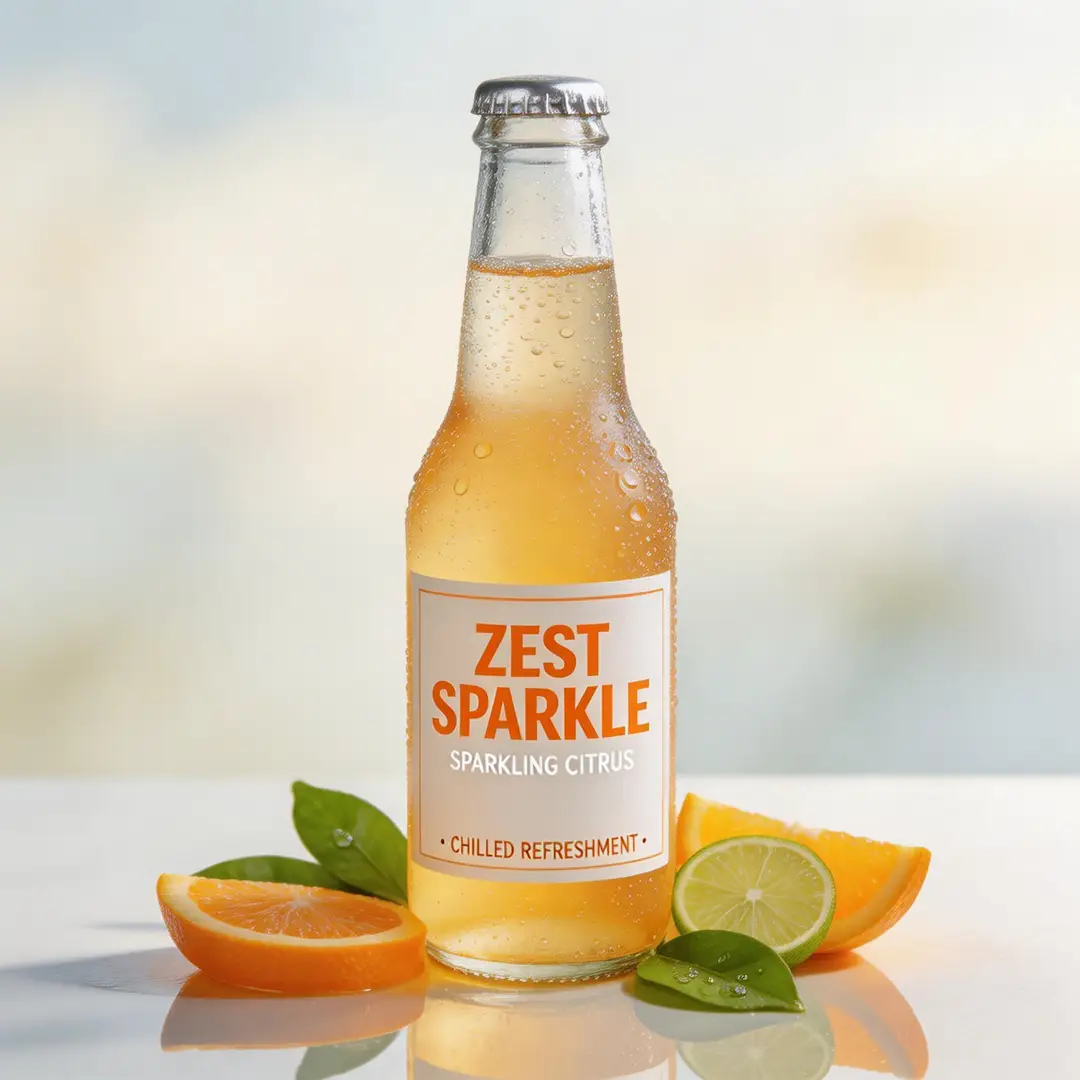
Ideal for commercial beverage visuals that require refinement, vibrant energy, and a crisp high-resolution finish.

A high-detail sparkling beverage campaign frame with polished lighting and impactful commercial energy.

High-Detail Sparkling Beverage Campaign Frame

Proven industry Prompt best-practice framework for creative generation workflows

[product] + [hero setup] + [palette] + [light] + [campaign tone]

Dive Into Full prompt Documentation & Technical BreakdownsExamine The Full Comprehensive Breakdown

Comprehensive prompt Breakdown & Full Overview

Craft a high-detail campaign frame for a sparkling citrus beverage. Feature a single chilled bottle covered in soft condensation, bright citrus garnishes, subtle reflective highlights, and a sleek premium summer campaign tone. The final image should feel polished and review-ready at full high resolution.

Core Functional Elements That Power This Prompt To Deliver Standout, High-fidelity Results

The detailed prompt gives Seedream 5.0 one clear focal product, a defined lighting narrative, and a specific commercial context, resulting in a strong, review-ready final frame.

Target Final AI-Created Visual Project Deliverable

A polished beverage campaign draft for brand review and product launch strategy planning.

Insider Pro Tips For Creative Industry Professionals

  • Put the hero product front and center for campaign-focused visuals.
  • Anchor the entire frame around a single seasonal or brand-specific mood.
Beauty & Skincare Visual

Complies with Premium prompt Alignment Benchmark Standards

Perfect for beauty and skincare visuals that require crisp detail and a premium commercial mood.

A luxury beauty close-up campaign image with premium lighting, controlled detail, and a polished commercial finish.

Luxury Beauty Close-Up Campaign Image

Proven industry Prompt best-practice framework for creative generation workflows

[subject] + [product or skin detail] + [light] + [palette] + [editorial-commercial tone]

Dive Into Full prompt Documentation & Technical BreakdownsExamine The Full Comprehensive Breakdown

Comprehensive prompt Breakdown & Full Overview

Create a close-up beauty campaign image featuring a model holding a glass serum bottle near their cheek. Use soft side lighting, a warm ivory and sage color palette, clean natural skin detail, and a polished editorial-commercial tone designed for a luxury skincare campaign review.

Core Functional Elements That Power This Prompt To Deliver Standout, High-fidelity Results

Seedream 5.0 delivers exceptional results for polished commercial beauty briefs when the subject, product, and color direction are tightly aligned.

Target Final AI-Created Visual Project Deliverable

A luxury beauty campaign concept for client review and creative direction alignment.

Insider Pro Tips For Creative Industry Professionals

  • Stick to a narrow color palette to keep skin and product visuals unified and cohesive.
  • Outline your desired campaign finish instead of just describing the core subject.
Brand Retail Environment

Complies with Premium prompt Alignment Benchmark Standards

Ideal for branded retail and environment concepts that need to look polished and ready for internal review.

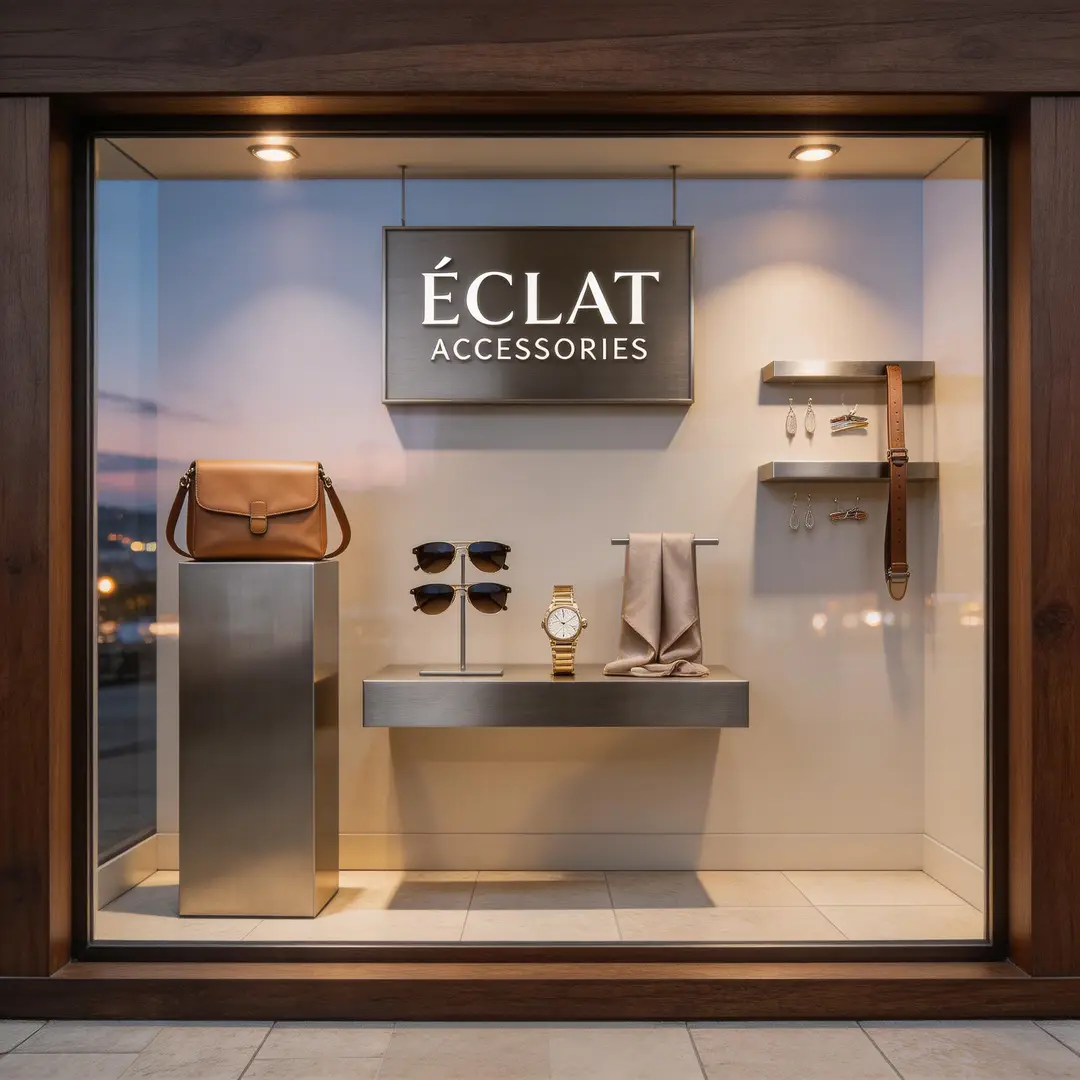
A modern retail window concept frame with polished materials, clean display composition, and a brand-ready atmosphere.

Modern Retail Window Concept Frame

Proven industry Prompt best-practice framework for creative generation workflows

[store or environment] + [display elements] + [materials] + [light] + [brand mood]

Dive Into Full prompt Documentation & Technical BreakdownsExamine The Full Comprehensive Breakdown

Comprehensive prompt Breakdown & Full Overview

Craft a premium retail window concept for a modern accessories brand. Include dark walnut framing, brushed metal display fixtures, pale stone flooring, soft evening lighting, and a sleek brand presentation mood. The final scene should be ready for inclusion in an internal retail strategy review deck.

Core Functional Elements That Power This Prompt To Deliver Standout, High-fidelity Results

The detailed prompt gives Seedream 5.0 a clear environment, defined material narrative, and explicit review context, resulting in a commercial, controlled final image.

Target Final AI-Created Visual Project Deliverable

A polished retail environment concept for brand and visual merchandising review sessions.

Insider Pro Tips For Creative Industry Professionals

  • List the primary display materials first before adding atmospheric finishing details.
  • Frame the scene as a review asset if you want the final output to look presentation-ready.
When to Choose Seedream 5.0

Pick Seedream 5.0 When You Want the Latest Seedream Workflow With Expanded Multi-Image Support

Seedream 5.0 is the smarter pick when your workflow requires updated Seedream family performance, support for multiple reference images, and polished high-resolution outputs all within one streamlined hosted page.

Pick Seedream 5.0 When Multiple Inputs Create a Polished Final Result

Use this workflow for campaign boards, product families, brand systems, and any task that relies on both multiple reference images and polished, review-ready final outputs.

Choose a Different Model When a Different Workflow Strength Is Your Top Priority

Pick Seedream 4.5 if sharp, high-resolution polish is your top priority, Seedream 4 if you prefer the earlier, established Seedream workflow, and Gemini 3 Pro Image if structured, text-led briefs are more critical to your project.

Creator & Community Insights

Independent Creator Walkthroughs & Third-Party Reviews of Seedream 5.0

These videos share independent creator perspectives on the latest Seedream family workflow. They help confirm Seedream 5.0’s updated performance, expanded multi-image capabilities, and how it compares to other hosted image generation tools.

Curated Gallery of AI-Driven Video Generation Masterpieces

FAQs

FAQ

About Omni Video Pro, Google Omni AI Video, and current generative AI video generation support

What exactly is Seedream 5.0?

Seedream 5.0 is this platform’s newest Seedream release, built to streamline polished image creation and multi-reference reference editing. It offers targeted family-specific performance and expanded multi-image support all wrapped into an intuitive hosted editing workflow.

What are the ideal use cases for Seedream 5.0?

Seedream 5.0 shines for brand campaign boards, lead product imagery, stylized commercial shots, consumer review assets, and any project that needs multiple reference images paired with high-resolution final outputs across a single unified workflow.

Can Seedream 5.0 accept image references when using this platform?

Absolutely. When using this platform, Seedream 5.0 allows uploading up to 14 reference images, opening up workflows like building detailed product line boards, matching precise color palettes, and executing multi-image creative direction projects with tight precision.

What resolution options does Seedream 5.0 offer on this page?

Seedream 5.0 offers 1K, 2K, and 4K resolution options on this page. Our hosted pipeline prioritizes crisp, high-resolution outputs aligned with the supported aspect ratios to match your project requirements.

What’s the best way to craft stronger Seedream 5.0 prompts?

Start by outlining your core subject, the unique role each reference image will serve, and your desired final output quality. Seedream 5.0 delivers best-in-class results when your prompt clearly defines how the finished image will fit into a review or campaign context, rather than asking the model to guess the full visual scenario independently.

When should I choose Seedream 5.0 over Seedream 4.5 or Gemini 3 Pro Image?

Pick Seedream 5.0 if you want the latest Seedream workflow with expanded multi-image support in one unified tool. Go with Seedream 4.5 if sharp, high-resolution polish is your top priority. Choose Gemini 3 Pro Image when structured, text-led briefs are critical to your project’s success.

Does Seedream 5.0 work well for multi-image product and campaign boards?

Without a doubt. Seedream 5.0 excels when you need to merge multiple reference images, product assets, or styling guidelines into one cohesive, polished campaign or review-ready visual.

Are outputs from Seedream 5.0 safe for commercial use?

For professional production projects, treat Seedream 5.0 outputs the same as any hosted AI generation tool’s results: run a full review before publishing or sharing. Commercial usability varies based on your specific use case, internal approval processes, and the platform’s terms of service applicable to this page.

Still have questions about Omni Video Pro? Our dedicated pro support team is ready to assist you

Join Our Creator Discord Server
Related Models

Compare Seedream 5.0 to Other Image Generation Models on This Site

If Seedream 5.0 isn’t the right fit for your project, browse these model pages to find a different Seedream family iteration, an alternative high-fidelity workflow, or a tool with stronger text-aware editing capabilities.

Seedream 4.5 Pro Image Generator

Try Seedream 4.5 if sharp, high-resolution polish is your top reason for picking an image generation model.

Explore Our Curated Selection Of Companion AI Generation Models

Seedream 4.0 Image Generator

Compare to Seedream 4 if you’re looking for the earlier, established Seedream workflow hosted on this site.

Explore Our Curated Selection Of Companion AI Generation Models

Gemini 3 Pro Image Generator

Test Gemini 3 Pro Image if you want an alternative high-fidelity hosted workflow built for structured creative briefs.

Explore Our Curated Selection Of Companion AI Generation Models

Flux 2 Pro Image Generator

Compare to Flux 2 Pro if you prefer a distinct polished visual style within a hosted image generation workflow.

Explore Our Curated Selection Of Companion AI Generation Models

Start Using Seedream 5.0 Today

Open the generator, begin with a clear campaign or review brief, and use Seedream 5.0 for polished high-resolution multi-image projects on this page.

Omni Video Pro Resources
  • Omni Video Pro Blog
  • Start Creating Omni Videos with Omni Video Pro
  • Omni Video Pro Scenes
  • My Generated Omni Video Works
  • Prompts
  • Image to Prompt
  • Batch Image to Prompt
Omni Video Pro Company & Omni Video Pro Legal
  • About Omni Video Pro
  • Contact Omni Video Pro
  • Omni Video Pro Privacy Policy
  • Omni Video Pro Terms of Service
  • Omni Video Pro Refund Policy
Image Models
  • Z-Image
  • GPT-4o
  • Flux 2
  • Flux 2 Pro
  • Flux 2 Klein
  • Qwen Image 2
  • Seedream 4.0
  • Seedream 4.5
  • Seedream 5.0
  • Grok Imagine
  • Gemini 3 Pro Image
  • Nano Banana Flash
  • Nano Banana 2
Video Models
  • Google Veo 3.1
  • Google Veo 3.1 Lite
  • Google Veo 3.1 Pro
  • Seedance 1.5 Pro
  • Seedance Fast
  • Seedance Quality
  • Seedance 2.0
  • Hailuo 02
  • Kling v2.6
  • Kling v2.5 Turbo
  • Kling v2.1
  • Kling v2.1 Master
  • Kling O1
  • Kling v3.0
  • Kling v3.0 Pro
Omni Video Pro Partnered Tools
  • Omni Video Pro
  • Seedream AI
  • Kling AI
LogoOmni Video Pro

Omni Video Pro AI video prompts · Current Model Generation · Omni Creator Waitlist

TwitterX (Twitter)DiscordEmail

Omni Video Pro is an independent third-party AI video workspace and AI video creator waitlist. We are not affiliated with Google, Gemini, Veo, OpenAI, ByteDance, or any model provider. Model availability, names, pricing, and capabilities may change without prior warning.

© 2026 Omni Video Pro All Rights Reserved. DREAMEGA INFORMATION TECHNOLOGY LLC

[email protected]